Working with Reporting Services Using Microsoft Sharepoint
page 1 of 3
Published: 25 Oct 2005
Abstract
This article explains different ways that companies can display reports on Sharepoint Portal.
by Ameet Phadnis
Feedback
Average Rating: This article has not yet been rated.
Views (Total / Last 10 Days): 105804/ 955

Introduction

There are many instances in which the business process requires executive reports or some company performance reports to show up on intranet sites. Companies do use different portals to build their intranet sites. Microsoft’s SharePoint technology is one such tool. The main task is how we display the reports stored under SQL Reporting Services on the SharePoint site. Microsoft does provide two Web parts with SQL Reporting Services SP 2. In this section I will share information on using the current web parts provided by Microsoft and then explain what exactly happens behind the scenes to display the report. Finally I will explain how you could create your own web part.

The two web parts provided by Microsoft are Report Explorer and Report Viewer.

Report Explorer Web Part

This web part displays all the reports in Report Manager. This allows the user to set the Report Manager property and display all the folders/reports under Report Manager. Next we will cover the properties of this web part.

Report Manager: This property should be set to the Report Manager and not where your Reports are saved. If you just set this property then your screen will look as follows.


Start Path: This property allows you to start your explorer view from the folder under which these reports are stored. For this article I am using the default reports provided by SQL Reporting Services. If you set the Start Path your screen will be as follows.
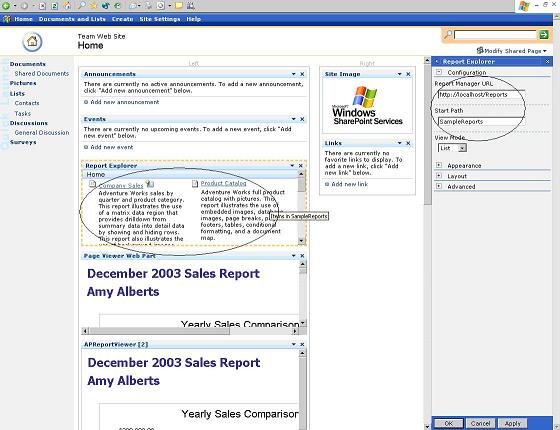
 

View Mode: There are two options.  The first option, List, will display all the Report names and the descriptions. No other details will be provided. The Report Explorer web part will look as follows.

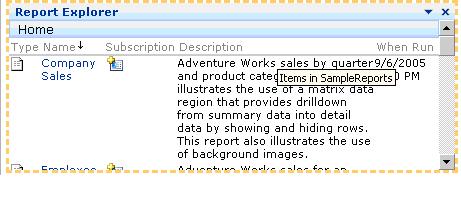
The second option is Detail.  This will display more information about the report in a table format with more data on when the report was last run, etc. The Report Explorer web part will look as follows.
Report Viewer Web Part

This web part is actually used to display the web part. You can either set the report to display in the properties or connect this web part to the Report Explorer web part.

Connecting to the Report Explorer: This is the easiest process. The steps required to accomplish this are:

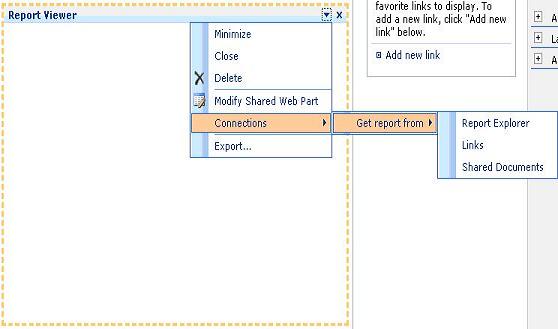
  1. Go into Modify Shared Web Part for the Report Viewer web part.
  2. Once in Modify Shared Web Part, you can go to Connections -> Get report from and select Report Explorer.
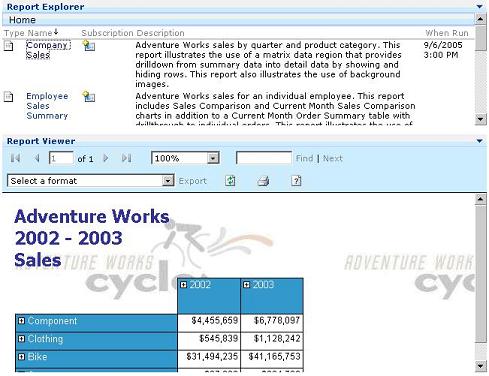
  3. Now you can test the report by clicking on some report in the Report Explorer. For my example, I will click on the Company Sales Report under the sample reports. Following is the snapshot on how the report will display for Company Sales Report.
We'll now cover the properties for this web part.

Report Manager URL: As explained in the Explorer View, this is where you enter the Report Manager’s URL. In my case, I am using http://localhost/Reports.

Report Path: This differs from the Report Explorer web part; it is here you actually specify the Report to be displayed. In my case, I am going to use Employee Sales Summary as I want to show how the parameters window displays. In the snapshot I have highlighted the properties window and the actual Report Viewer web part. When there are parameters to be passed to the report, your report won’t render till you enter the parameters and click the View Report Button.
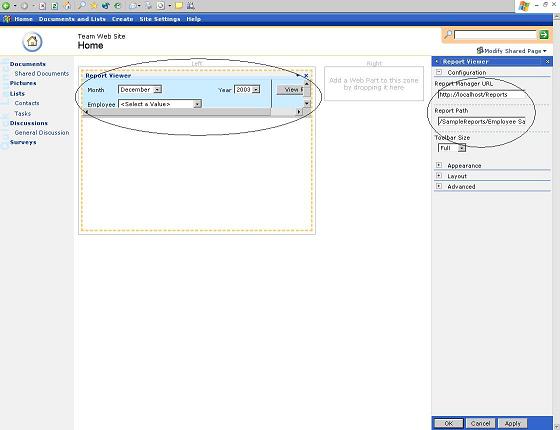
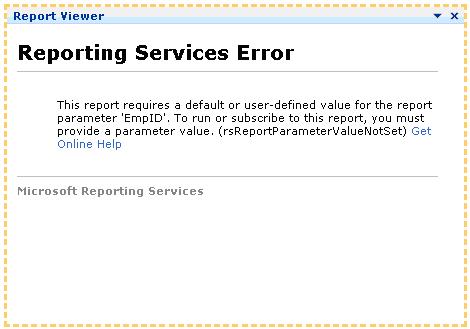
Toolbar Size: There are three different options for this as follows.  The first option is None, which will remove the toolbar altogether. For reports that do not use Parameters, this option works fine. But for reports that do use parameters, this option will display an error because the report is being rendered without any parameters being passed to it.

Now the question arises: what if I would like to pass default parameters to the screen and not display the Toolbar?  That’s where you will build your own Report Viewer web part as explained later in this article. You will see an error as follows on the above mentioned report if you set the Toolbar size to None.
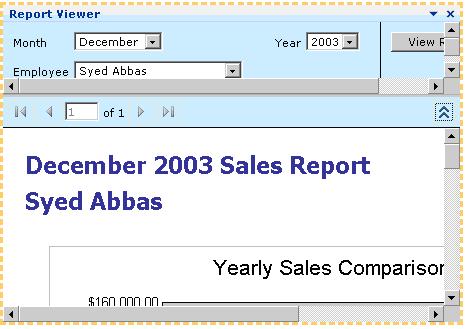
The second option, Small, will display the parameter window.  The only part that is displayed for the toolbar is the scrolling part that assists the user in scrolling through pages. Your Report Viewer web part will look like the following.
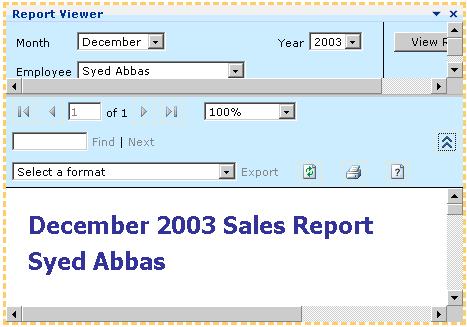
This last option if Full.  This will display all the options including find, exporting the report, refresh, print, and help to create the report. Your screen will appear as below.
Section Summary

In this section I explained how you actually display reports using the Reporting Services Web parts provided by Microsoft. In the next section, I will explain the different options you could use to display the Reports with the default parameters set.


View Entire Article

Article Feedback

Title:  
Name:  
Url: ( Optional )
Comment:  
Please add 8 and 6 and type the answer here:

User Comments

Title: How to generate canned report in Sharepoint   
Name: Bala
Date: 3/13/2008 7:39:14 AM
Comment:
I need to generate the canned reports in MOSS 2007.If anybody knows please give the steps.

Thanks
Title: link with Sharepoint List   
Name: Bistesh
Date: 3/4/2008 7:46:48 AM
Comment:
Hi,
finally I got to link with the SP List items and web service with reporting viewer controls . We have to use the custom dataset to bind,.
Thanks
Title: What Edition of MOSS   
Name: Imad Mansour
Date: 2/29/2008 8:27:21 AM
Comment:
Excellent article.

just would like to know what edition of MOSS do we need to use reporting services EE or SE ???
Title: How to link with Sharepoint List   
Name: bistesh
Date: 1/28/2008 4:23:16 AM
Comment:
Hi, Can you plz tell me that how to link the rdl file with the sharepoint list item so that I have to fetch the data from SP list and display in the report
Title: Images showing correctly for me   
Name: Brendan
Date: 1/9/2008 11:49:22 AM
Comment:
I am not having any problems seeing the images.
Title: Images are not dispplaying properly   
Name: ramesh
Date: 1/9/2008 5:44:36 AM
Comment:
Thanks for this good article.But at the same time pls find that the Images are not dispplaying properly(Images not found). Pls upload the images into proper folder. These are not displaying.
Title: beginner   
Name: anne
Date: 8/15/2007 9:02:44 PM
Comment:
can u please tell me where i can view the Report Viewer and report explorer? i cant find them

thnx a bunch
Title: Beginner   
Name: max
Date: 7/5/2007 12:21:54 AM
Comment:
Hi, i'm a beginner to RS and MOSS. Thanks very much for giving me a resolution for my problem. I had the same problem with connecting Explorer to Viewer. Setting the trust level to WSS_Medium solved the problem. Thanks a lot. Another question would be: when I try to set up RS/MOSS integrated mode rather than native mode, it gives me an error that it can't create a new database for Integration mode even though I am an admin on the box and have full rights on the MOSS server. Any ideas? I draw blank and no resources on the internet or Microsoft site. Thanks.
Title: how to use report viewer on sharepoint   
Name: Joe
Date: 6/28/2007 2:34:07 AM
Comment:
Hi, I'm confused about how to display report in sharepoints. The problem is report manager is appears on report viewer web parts. my question is how to display report on sharepoints without report manager?
Title: Mr   
Name: VIral Shah
Date: 3/22/2007 7:59:55 PM
Comment:
Hi, This is a very good artical, but can you help me with one question which will be really appreciated. I have added one text box on my report, can user enter the text during runtime and can get print of that. I need to do it. Can you Please Help me out. THank you. My Email Address Is: viruchi2002@yahoo.com
Title: Where is the information entered on the ServerURL stored?   
Name: Tim Toennies
Date: 2/6/2007 12:46:32 PM
Comment:
Do you know where this value is stored? Is it in SharePoint's Config database or some other file? I need to know because I want to change the setting for about 90 WebParts and I would rather not have to open each of them individually. Thanks very much for your help.
Title: RE: Having same issue as Gilles   
Name: Mike Knuth
Date: 1/8/2007 9:25:33 AM
Comment:
Ameet:

You were correct. WSS_Minimal, doesn't seem to allow those Web Parts to connect up in MOSS. Modifying the web.config to change the trust level to WSS_Medium, took care of the issue.

Thank you.
Title: RE: Having same issue as Gilles   
Name: Mike Knuth
Date: 1/3/2007 6:31:37 PM
Comment:
I installed the RSWebParts in the GAC. I thought they ran with full trust by default if they were in the GAC? Is there some other setting I missed?
Title: Having same issue as Gilles   
Name: Ameet
Date: 1/3/2007 4:17:50 PM
Comment:
Did you try adjusting the trust level in your Web.Config file? Most probably that should fix it.
Title: Good Info: Having same issue as Gilles   
Name: Mike Knuth
Date: 1/3/2007 3:43:15 PM
Comment:
Nice article. We used some of the information to create our own Web Parts to use on a dashboard. Thanks for the jumpstart!

Gilles:

Did you ever get your issue with connecting the Report Explorer and Viewer parts (in MOSS) squared away? I ran into the same thing this morning. You can put the viewer and explorer web parts on the same page and they work just fine. When you try to connect the viewer with the explorer, it blows up.

If you look in the Event Log, you might see something like: Request for the permission of type 'Microsoft.SharePoint.Security.SharePointPermission, Microsoft.SharePoint.Security, Version=12.0.0.0, Culture=neutral, PublicKeyToken=71e9bce111e9429c' failed.

If you have any info, please post back. Thanks.
Title: Excellent Article   
Name: Gilles Urena
Date: 12/19/2006 5:40:16 PM
Comment:
Great article. I have implemented on a MOSS platform and found out the connection b/w the explorer and the viewer is not working. Each web part is working individually.
Title: Excellent   
Name: Anwar
Date: 11/30/2006 1:28:26 AM
Comment:
Ameet, Thanks for sharing your knowledge. This is indeed a wonderful article. I was quite confused since long, but this article has helped me in understanding and getting the things correctly. Thanks a lot buddy!
Title: Good article but ..   
Name: Patrick
Date: 10/25/2006 1:53:57 AM
Comment:
I tried to follow the the exercise but its confusing when you mentioned :-
the best way is to web part is to convert the Report Viewer Web Control application provided with SQL Reporting Services. I have the ReportViewer application.But its not really clear in your article how to use it.How to convert that application to a web part? Some properties etc are missing with what you have on your article compared to whats in the application report viewer.
Title: Good article but ..   
Name: Patrick
Date: 10/25/2006 1:52:20 AM
Comment:
I tried moving whats in the report viewer app to a WEB PART LIBRARY BUT I GET ERROR
"One of the properties of the Web Part has an incorrect format. Windows SharePoint Services cannot deserialize the Web Part. Check the format of the properties and try again."
Title: Problem with direct connection   
Name: A
Date: 10/23/2006 1:50:22 PM
Comment:
Check the Web Parts which you created. Check if you are using the right web parts (Consumer or Provider)
Title: Problem with direct connection   
Name: Simone
Date: 10/23/2006 11:13:40 AM
Comment:
Hi, I made the excercise but, the direct connection between Report Explorer and Report Viewer doesn't work! What is the possible problem?
Title: GoBack to Parent in WebPart   
Name: Hugo Eduardo Perez
Date: 10/17/2006 11:47:05 AM
Comment:
It is a very good article. I need add GoBack to Parent button or control in WebPart in child reports for Go Back to de Parent Report, simmilar to Preview in report Designer. The Standar Button is Hide (in Internet Explorer).
It´s possible Go Gack to parent in WebPart Sharepoint ReportViewer?!!

Thanks, and if you could e-mail me any information you think helpfull @: hugoeperezm@yahoo.com.
Thank You very much!
Title: Displaying the three parameters in a single row   
Name: Ameet
Date: 10/11/2006 5:06:40 PM
Comment:
You need to write your own parameter control for that.

Thanks,

Ameet
Title: Displaying the three parameters in a single row   
Name: Athmaram
Date: 10/7/2006 6:50:29 AM
Comment:
Hi, I have an issue regarding displaying the 3 parameters in single row. by default sql reporting services display only 2 parameters in a row. Kindly help me how to display 3 parameters in a single row in report manager.(ie during preview or generating the report). Kindly send the suggestions to athmaramp@gmail.com
Title: Bug in Jump to Url   
Name: Mugnaboa
Date: 9/15/2006 9:10:49 AM
Comment:
I open my report in a iframe. I use a "jump to url" link in the report with the javascript code, i need to jump in a new window. It's not work!
Title: I couldn't use this in SPA2007   
Name: K K
Date: 9/4/2006 5:14:39 AM
Comment:
I was able to use the settings mentioned in SPS2003 but not in 2007. I get the error while connecting explorer and viewer. Error message is Request for the permission of type 'Microsoft.SharePoint.Security.SharePointPermission, Microsoft.SharePoint.Security, Version=12.0.0.0, Culture=neutral, PublicKeyToken=71e9bce111e9429c' failed
Title: Excellent   
Name: Aron Roberto
Date: 8/29/2006 9:37:36 PM
Comment:
It is a very good article, I have to convert intranet to sharepoint, and I have no idea where to begin, even though your article was help full. can you please refer to me books or sites or any think you believe that can help me accomplish this project. Thanks, and if you could e-mail me any information you think helpfull @: bn_aron@yahoo.com.
Thank You very much!
Title: I could'nt finish the example I had some errors   
Name: Heis
Date: 7/10/2006 2:15:06 PM
Comment:
I made the exercise but, I had some error at the moment to ocmpile, this variable reportParameters what kind of type is it? In fact i did it in C#


Ads Powered by Lake Quincy Media
Community Advice: ASP | SQL | XML | Regular Expressions | Windows


©Copyright 1998-2008 ASPAlliance.com  |  Page Processed at 8/29/2008 8:49:30 PM  AspAlliance Recent Articles RSS Feed
About ASPAlliance | Newsgroups | Advertise | Authors | Email Lists | Feedback | Link To Us | Privacy | Search